Real command sequences
Students learn the order of operations, where commands live, and how CATIA expects mouse and keyboard input.

CATIA V5 training for Windows PCs
Practice real mouse movements, menu picks, sketching, part design, and assembly workflows in a local simulator built for people who need job-ready CATIA skills.
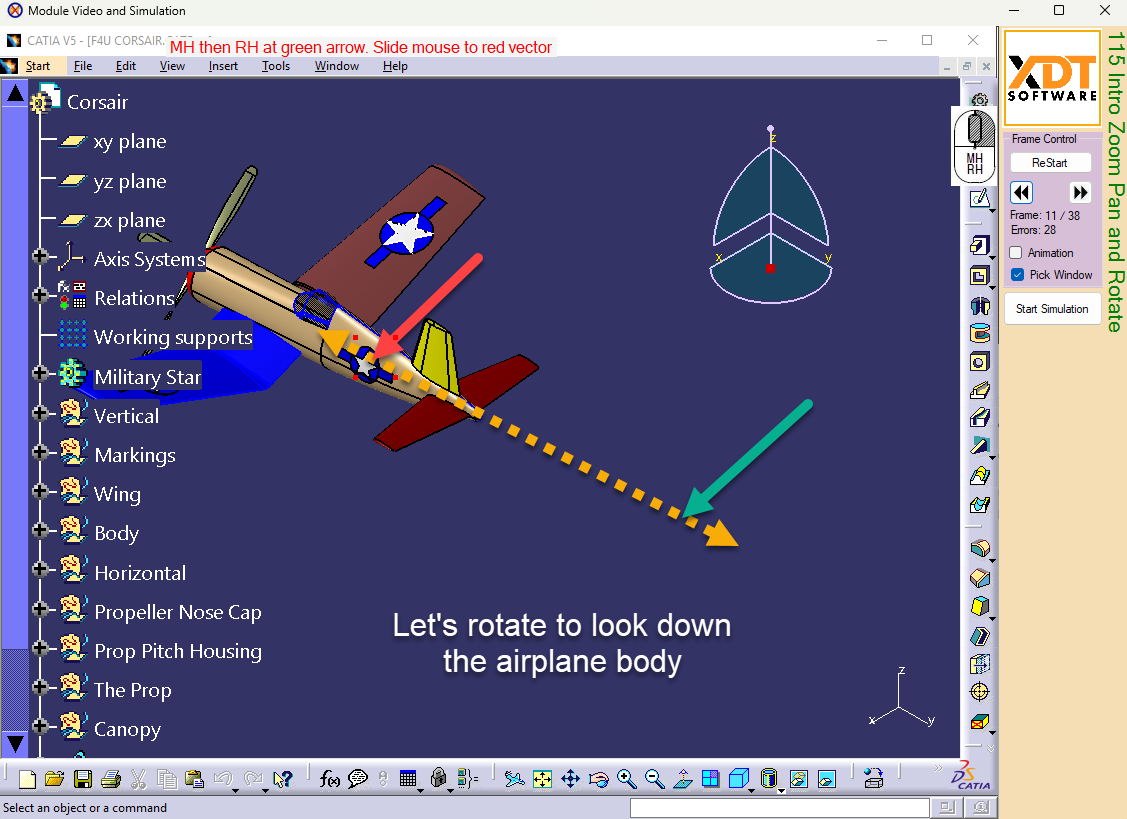
You get one full year's access to our PC simulation training to keep your training current, for reference material, or for that new job. The simulation method makes you feel like you are using actual CATIA. You get all the muscle memory additional learning, in a structured teaching method developed by experts in efficient CATIA design.
Students learn the order of operations, where commands live, and how CATIA expects mouse and keyboard input.
Each module can show the learner what to select next, where they went wrong, and how to complete the modeled feature.
Use your new skills for design and manufacturing for major aerospace companies like Boeing, Lockheed, Gulfstream, Northrop Grumman, Airbus, Bombardier, and their supply chain.
Instructor experience
All course content was created by Kaae Rillos, a longtime CATIA instructor and automation developer.
XDT Software was incorporated in 2002 and has been focused on supplying CATIA training since then.
Real student outcomes and confidence matter more than generic course promises.
"The skills learned during the class gave me confidence that I could get up to speed and be productive using Catia v5 in a short amount of time at work. The knowledge acquired is useful for fundamental and advanced applications. The on line simulator courses are very useful to bring you up to the next level of proficiency and keep you there until you are situated in a working environment. I don't think there are any other courses like the XDT Catia v5 training courses. Looking forward to additional classes and would definitely recommend it."Frank Mierau
"I wish to write in regards to the v5 online training I recently completed. The courses are thorough and well thought out. The presentation is also well paced and the site loads quickly and error free. As it is an online course with 21 days to complete it leaves ample time to pause, and backup on any parts that are complex and require more time to fully comprehend. Another facet of this training is that the staff is very accessible and helpful. I had a couple of questions during my training and they were answered if not immediately then very shortly thereafter. I never felt embarrassed or that they were too busy to answer them. This by itself is crucial to being able to feel comfortable learning a new and complex engineering software package. I have currently accepted a v5 design position at a Fortune 500 company and it is in no small part due to having acquired proficiency in this software from these online tutorials."Robert Bishop
"I am very thankful for the online training material that is put together by XDT Software. Mr. Rillos helped me get setup and going within this interactive online training. The online training program increased my retention of how to navigate through the software and I enjoy the emphasize on using the specification tree to most effective level. The lessons are enjoyable and the skills learned gives the user a foundation that he/she can build on. I recommend this training to anyone that needs to learn CATIA V5."John Khoury
"My experience with the Catia V5 simulation was fantastic. I had no experience with Catia prior to the class, but with the focused, well planned program, I was able to navigate and create confidently and efficiently. The presentation and industry expertise makes the learning experience, not only professionally oriented, but also enjoyable."Dave Beauregard
"That was a great course for my level; someone with some CAD experience, but no Catia experience. So thank you!"Joseph Sullivan
"This course is well done and clear. It not only provides details on the differences of CATIA vs other CAD software, but gave simulated practice opportunities that give real practice and muscle memory. The videos are well structured and helpful, and the precision of the simulation makes it clear when you make a mistake. For anyone who seeks to understand the fundamentals and practical applications of CATIA this is a great place to start."Ivan Warner
These cards create internal SEO links and guide buyers toward the right landing page.
For students who already know they want structured CATIA V5 instruction.
View CourseFor students searching for a practical way to learn CATIA without access to the software.
Learn HowFor students pursuing aerospace design, manufacturing, supplier, or Boeing-adjacent roles.
See Career PathGive students a low-risk way to see the interface, installation steps, and training style.